Like us on Facebook and stand a chance to win pen drives!

Showing posts with label jQueryMobile. Show all posts

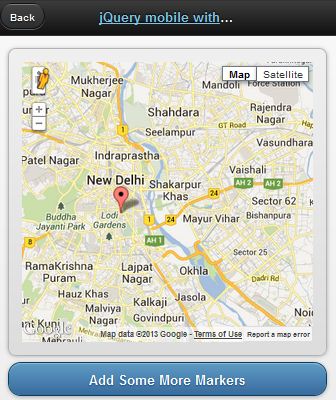
jQueryMobile with Google Map


This demo is based on jQuery UI plugin for Google Maps.


<!doctype html>
<html lang="en">
<head>
<title>jQuery mobile with Google maps</title>
<link rel="stylesheet" href="http://code.jquery.com/mobile/1.2.0/jquery.mobile-1.2.0.min.css" />
<script src="http://code.jquery.com/jquery-1.8.2.min.js"></script>
<script src="http://code.jquery.com/mobile/1.2.0/jquery.mobile-1.2.0.min.js"></script>
<script type="text/javascript" src="http://maps.google.com/maps/api/js?v=3&sensor=false&language=en"> </script>
<script type="text/javascript" src="http://jquery-ui-map.googlecode.com/svn/trunk/ui/min/jquery.ui.map.min.js"></script>
<script type="text/javascript">

var colombo = new google.maps.LatLng(26.5727,73.8390);
var delhi = new google.maps.LatLng(28.6100,77.2300);
mobileDemo = { 'center': '28.6100,77.2300', 'zoom': 12 };

function initialize() {
$('#map_canvas').gmap({ 'center': mobileDemo.center, 'zoom': mobileDemo.zoom, 'disableDefaultUI':false });
$('#map_canvas').gmap('addMarker', { 'position': delhi } );
}

$(document).on("pageinit", "#basic-map", function() {
initialize();
});

$(document).on('click', '.add-markers', function(e) {
e.preventDefault();
$('#map_canvas').gmap('addMarker', { 'position': colombo } );
});
</script>
</head>
<body>
<div id="basic-map" data-role="page">
<div data-role="header">
<h1><a data-ajax="false" href="#">jQuery mobile with Google</a></h1>
<a data-rel="back">Back</a>
</div>
<div data-role="content">
<div style="padding:1em;">
<div id="map_canvas" style="height:350px;"></div>
</div>
<a href="#" data-role="button" data-theme="b">Add Some More Markers</a>
</div>
</div>
</body>
</html>

HTML5 Data Storage
HTML5 Data Storage

HTML5 supports client side data storage. There are several types of storing data with HTML5

1. local storage through localStorage object

2. session storage through sessionStorage object

3. SQL based database

This tutorial demonstrates how to manage a client side SQL based database with HTML5.

Demo


<!DOCTYPE html>
<html>
    <head>
        <meta name=viewport content="user-scalable=no,width=device-width" />
        <link rel="stylesheet" href="css/jquery.mobile-1.1.0.min.css" />
        <script src="js/jquery-1.7.2.min.js"></script>
        <script src="js/jquery.mobile-1.1.0.min.js"></script>
    </head>
    <body>
        <div data-role=page id=home>
            <div data-role=header>
                <h1>Home</h1>
            </div>
 
            <div data-role="content">
                <a href="#" data-role="button" id="create"> Create table </a>
                <a href="#" data-role="button" id="remove"> Delete table </a>
                <span> Item </span>
                <input type="text" id="item">
                <span> Quantity </span>
                <input type="text" id="quantity">
                <a href="#" data-role="button" id="insert">Insert item</a>
                <a href="#" data-role="button" id="list">List items </a>
 
                <ul data-inset="true" data-role="listview" id="itemlist"></ul>
            </div>
        </div>
 
        <script>
            var db = openDatabase ("itemDB", "1.0", "itemDB", 65535);
            $("#create").bind ("click", function (e)
            {
                db.transaction (function (transaction)
                {
                    var sql = "CREATE TABLE items " +
                        " (id INTEGER NOT NULL PRIMARY KEY AUTOINCREMENT, " +
                        "item VARCHAR(100) NOT NULL, " +
                        "quantity int(2) NOT NULL)"
                    transaction.executeSql (sql, undefined, function ()
                    {
                        alert ("Table created");
                    },error
                );
                });
            });
 
            $("#remove").bind ("click", function (e)
            {
                if (!confirm ("Delete table?", "")) return;;
                db.transaction (function (transaction)
                {
                    var sql = "DROP TABLE items";
                    transaction.executeSql (sql, undefined, success, error);
                });
            });
 
            $("#insert").bind ("click", function (event)
            {
                var item = $("#item").val ();
                var quantity = $("#quantity").val ();
                db.transaction (function (transaction)
                {
                    var sql = "INSERT INTO items (item, quantity) VALUES (?, ?)";
                    transaction.executeSql (sql, [item, quantity], function ()
                    {
                        alert ("Item created!");
                    }, error);
                });
            });
 
            $("#list").bind ("click", function (event)
            {
                $("#itemlist").children().remove()
                db.transaction (function (transaction)
                {
                    var sql = "SELECT * FROM items";
                    transaction.executeSql (sql, undefined,
                    function (transaction, result)
                    {
 
                        if (result.rows.length)
                        {
                            for (var i = 0; i < result.rows.length; i++)
                            {
                                var row = result.rows.item (i);
                                var item = row.item;
                                var quantity = row.quantity;
                                $("#itemlist").append("<li>" + item + " - " + quantity + "</li>");
                            }
                        }
                        else
                        {
                            $("#itemlist").append("<li> No items </li>");
                        }
                    }, error);
 
                });
 
            });
 
            function success ()
            {
            }
 
            function error (transaction, err)
            {
                alert ("DB error : " + err.message);
                return false;
            }
        </script>
    </body>
 
</html>


Please note that Firefox does not support this type of web SQL databases. If you try this in a FF browser, it will throw "ReferenceError: openDatabase is not defined".
Copyright © 2012 The Code Junction.