Like us on Facebook and stand a chance to win pen drives!


MongoDB
PHP CRUD with MongoDB

Today we gonna make our hands dirty with some MongoDB stuff. MongoDB is a no-SQL type, schema-less database. Such databases can be very useful in situations where there is much more user-generated content. You should understand where you use MongoDB or Apache CouchDB rather than traditional relational databases. You may want to google for getting more details about MongoDB if you gonna try this tutorial as a newbie.

First download and install MongoDB in your environment.

As we are trying this tutorial in PHP, you should download mongo driver for PHP also.

Edit php.ini so that it can load mongo driver. Add this line(in Windows)

extension=php_mongo.dll

Now we are good to go.

Run MongoDB server and start Mongo shell.

First you need to create a database and add a database user. If this is the first time you 're going to create a database user, first you need to create an admin user. Read documentation for more details.

This tutorial is all about a simple CRUD application using MongoDB. In this application a blog post scenario is used for demonstrating CRUD operations. This scenario is very popular in MongoDB Hello World tutorials.

This tutorial does not include complete source code.


DB class


class DB {

const DBHOST = 'localhost';
const DBUSER = 'codezone4';
const DBPWD = '123';
const DBPORT = 27017;
const DBNAME = 'blog_db';

private static $instance;
public $connection;
public $databse;

private function __construct() {
$connection_string = sprintf('mongodb://%s:%s@%s:%d/%s', DB::DBUSER, DB::DBPWD, DB::DBHOST, DB::DBPORT, DB::DBNAME);
try {
$this->connection = new Mongo($connection_string);
$this->databse = $this->connection->selectDB(DB::DBNAME);
} catch (MongoConnectionException $e) {
throw $e;
}
}

static public function instantiate(){
if(!isset(self::$instance)){
$class = __CLASS__;
self::$instance = new $class;
}
return self::$instance;
}

public function get_collection($name){
return $this->databse->selectCollection($name);
}

}

Add New Post


include 'db.class.php';
if(isset($_POST['add_post'])){
$title = $_POST['title'];
$content = $_POST['content'];

if(!empty($title) && !empty($content)){

$mongo =  DB::instantiate();
$post_collection = $mongo->get_collection('posts');
$post = array(
'_id' => hash('sha1', time() . $title),
'title' => $title,
'content' => $content,
'created_on' => new MongoDate()
);
$post_id = $post_collection->insert($post,array('safe'=>TRUE));
header('Location:../dashboard.php');
}
}

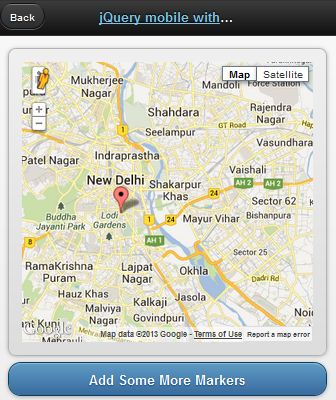
jQueryMobile with Google Map


This demo is based on jQuery UI plugin for Google Maps.


<!doctype html>
<html lang="en">
<head>
<title>jQuery mobile with Google maps</title>
<link rel="stylesheet" href="http://code.jquery.com/mobile/1.2.0/jquery.mobile-1.2.0.min.css" />
<script src="http://code.jquery.com/jquery-1.8.2.min.js"></script>
<script src="http://code.jquery.com/mobile/1.2.0/jquery.mobile-1.2.0.min.js"></script>
<script type="text/javascript" src="http://maps.google.com/maps/api/js?v=3&sensor=false&language=en"> </script>
<script type="text/javascript" src="http://jquery-ui-map.googlecode.com/svn/trunk/ui/min/jquery.ui.map.min.js"></script>
<script type="text/javascript">

var colombo = new google.maps.LatLng(26.5727,73.8390);
var delhi = new google.maps.LatLng(28.6100,77.2300);
mobileDemo = { 'center': '28.6100,77.2300', 'zoom': 12 };

function initialize() {
$('#map_canvas').gmap({ 'center': mobileDemo.center, 'zoom': mobileDemo.zoom, 'disableDefaultUI':false });
$('#map_canvas').gmap('addMarker', { 'position': delhi } );
}

$(document).on("pageinit", "#basic-map", function() {
initialize();
});

$(document).on('click', '.add-markers', function(e) {
e.preventDefault();
$('#map_canvas').gmap('addMarker', { 'position': colombo } );
});
</script>
</head>
<body>
<div id="basic-map" data-role="page">
<div data-role="header">
<h1><a data-ajax="false" href="#">jQuery mobile with Google</a></h1>
<a data-rel="back">Back</a>
</div>
<div data-role="content">
<div style="padding:1em;">
<div id="map_canvas" style="height:350px;"></div>
</div>
<a href="#" data-role="button" data-theme="b">Add Some More Markers</a>
</div>
</div>
</body>
</html>
Relying on $_SERVER['REMOTE_ADDR'] to find your client's ip address is not always good. Looking for a wide solution?

Then use this function.

function get_ip() {
$ip = '';
if ($_SERVER['HTTP_CLIENT_IP'])
$ip = $_SERVER['HTTP_CLIENT_IP'];
else if($_SERVER['HTTP_X_FORWARDED_FOR'])
$ip = $_SERVER['HTTP_X_FORWARDED_FOR'];
else if($_SERVER['HTTP_X_FORWARDED'])
$ip = $_SERVER['HTTP_X_FORWARDED'];
else if($_SERVER['HTTP_FORWARDED_FOR'])
$ip = $_SERVER['HTTP_FORWARDED_FOR'];
else if($_SERVER['HTTP_FORWARDED'])
$ip = $_SERVER['HTTP_FORWARDED'];
else if($_SERVER['REMOTE_ADDR'])
$ip = $_SERVER['REMOTE_ADDR'];
else
$ip = '';
 
return $ip;
}
 
 Swift Mailer
 Swift Mailer

"Swift Mailer integrates into any web app written in PHP 5, offering a flexible and elegant object-oriented approach to sending emails with a multitude of features."

Download Documentation


<!--?php require_once 'swiftmailer/lib/swift_required.php'; // Create the Transport //SMTP /*$transport = Swift_SmtpTransport::newInstance('smtp.example.org', 25) --->setUsername('your username')
->setPassword('your password')
;
 
*/
 
// Sendmail
//$transport = Swift_SendmailTransport::newInstance('/usr/sbin/sendmail -bs');
 
// Mail
$transport = Swift_MailTransport::newInstance();
 
// Create the Mailer using your created Transport
$mailer = Swift_Mailer::newInstance($transport);
 
// Create a message
$message = Swift_Message::newInstance('Wonderful Subject')
->setFrom(array('john@doe.com' => 'John Doe'))
->setTo(array('receiver@domain.org', 'other@domain.org' => 'A name'))
->setBody('Here is the message itself')
;
 
// Send the message
$result = $mailer->send($message);
?>


jQuery UI Dialog
jQuery UI Dialog


<div id="dialog" title="Delete">
<p>Are you sure that you want to delete this division?</p>
</div>
 
 
$("#dialog").dialog({
modal: true,
resizable: false,
width: 800,
buttons: [{
text: "Yes",
click: function() {
alert("Clicked Yes");
}
},
{
text: "No",
click: function() {
$(this).dialog("close");
}
}]
 
});


HTML5 Data Storage
HTML5 Data Storage

HTML5 supports client side data storage. There are several types of storing data with HTML5

1. local storage through localStorage object

2. session storage through sessionStorage object

3. SQL based database

This tutorial demonstrates how to manage a client side SQL based database with HTML5.

Demo


<!DOCTYPE html>
<html>
    <head>
        <meta name=viewport content="user-scalable=no,width=device-width" />
        <link rel="stylesheet" href="css/jquery.mobile-1.1.0.min.css" />
        <script src="js/jquery-1.7.2.min.js"></script>
        <script src="js/jquery.mobile-1.1.0.min.js"></script>
    </head>
    <body>
        <div data-role=page id=home>
            <div data-role=header>
                <h1>Home</h1>
            </div>
 
            <div data-role="content">
                <a href="#" data-role="button" id="create"> Create table </a>
                <a href="#" data-role="button" id="remove"> Delete table </a>
                <span> Item </span>
                <input type="text" id="item">
                <span> Quantity </span>
                <input type="text" id="quantity">
                <a href="#" data-role="button" id="insert">Insert item</a>
                <a href="#" data-role="button" id="list">List items </a>
 
                <ul data-inset="true" data-role="listview" id="itemlist"></ul>
            </div>
        </div>
 
        <script>
            var db = openDatabase ("itemDB", "1.0", "itemDB", 65535);
            $("#create").bind ("click", function (e)
            {
                db.transaction (function (transaction)
                {
                    var sql = "CREATE TABLE items " +
                        " (id INTEGER NOT NULL PRIMARY KEY AUTOINCREMENT, " +
                        "item VARCHAR(100) NOT NULL, " +
                        "quantity int(2) NOT NULL)"
                    transaction.executeSql (sql, undefined, function ()
                    {
                        alert ("Table created");
                    },error
                );
                });
            });
 
            $("#remove").bind ("click", function (e)
            {
                if (!confirm ("Delete table?", "")) return;;
                db.transaction (function (transaction)
                {
                    var sql = "DROP TABLE items";
                    transaction.executeSql (sql, undefined, success, error);
                });
            });
 
            $("#insert").bind ("click", function (event)
            {
                var item = $("#item").val ();
                var quantity = $("#quantity").val ();
                db.transaction (function (transaction)
                {
                    var sql = "INSERT INTO items (item, quantity) VALUES (?, ?)";
                    transaction.executeSql (sql, [item, quantity], function ()
                    {
                        alert ("Item created!");
                    }, error);
                });
            });
 
            $("#list").bind ("click", function (event)
            {
                $("#itemlist").children().remove()
                db.transaction (function (transaction)
                {
                    var sql = "SELECT * FROM items";
                    transaction.executeSql (sql, undefined,
                    function (transaction, result)
                    {
 
                        if (result.rows.length)
                        {
                            for (var i = 0; i < result.rows.length; i++)
                            {
                                var row = result.rows.item (i);
                                var item = row.item;
                                var quantity = row.quantity;
                                $("#itemlist").append("<li>" + item + " - " + quantity + "</li>");
                            }
                        }
                        else
                        {
                            $("#itemlist").append("<li> No items </li>");
                        }
                    }, error);
 
                });
 
            });
 
            function success ()
            {
            }
 
            function error (transaction, err)
            {
                alert ("DB error : " + err.message);
                return false;
            }
        </script>
    </body>
 
</html>


Please note that Firefox does not support this type of web SQL databases. If you try this in a FF browser, it will throw "ReferenceError: openDatabase is not defined".
Copyright © 2012 The Code Junction.